Video editor · Linux · Windows
A free video editor for Linux and Windows
Multi-track timeline with real-time preview, nested reels, 33 transitions, 26 video and 18 audio effects, curve automation on every parameter, titles and generators. Export to MP4 renders exactly what the preview shows.
Rendering
One code path
The preview and the MP4 export are composited by the same code. The exported frame is the frame shown in the preview.
Repeatable output
Rendering the same project twice on the same machine produces identical files, whatever was played or scrubbed in between.
Scrolling does not decode video
Waveforms, filmstrips and thumbnails are read from an index built once per file. Scrolling and zooming the timeline use only that index.
Hardware encoding
NVIDIA, AMD and Intel encoders are detected automatically, with a software encoder as the fallback. Export writes no temporary files.
Timeline
Video, audio and morph tracks. Each track has mute, solo, lock, its own effects, opacity and blend mode. Drag a track header to move the track.

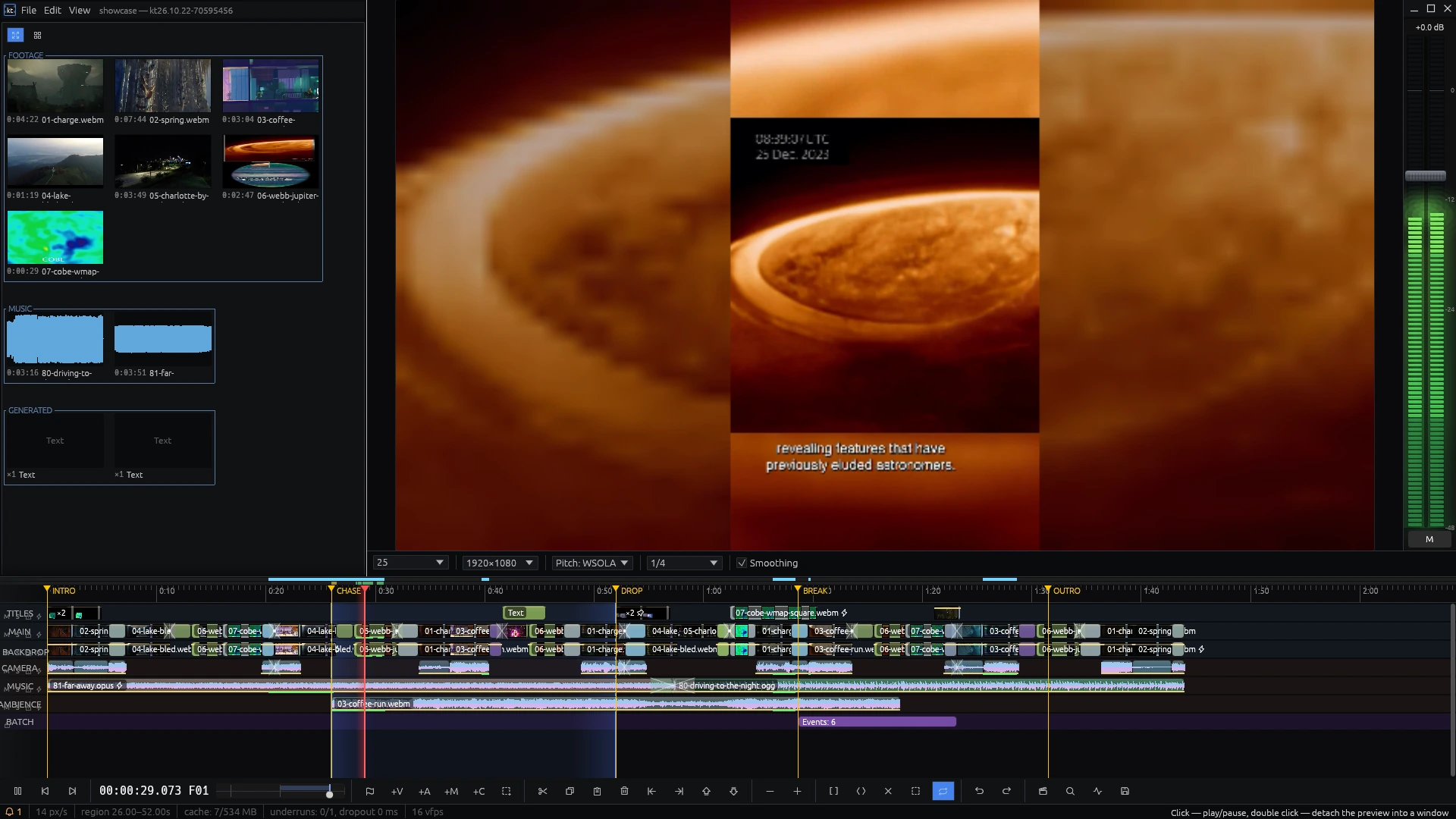
The reel STINGER expanded in the middle of the edit. The parts of the reel outside this instance are veiled.
- Split and trimS splits at the playhead. Drag an edge of an event to trim it.
- RegionI and O set the region. It can be copied, deleted, cut out of every event it crosses, looped and rendered.
- SnappingEvents snap to event edges, markers, region bounds, the playhead and zero. Hold Ctrl while dragging to turn snapping off.
- MarkersM adds a marker and opens its name field. Markers can be dragged along the ruler and are found by search.
- ReelsCollapse a selection into a reel and use it any number of times; changes to the reel apply to every copy. Enter expands a reel on the timeline. Published parameters give each copy its own values.
- Fades and crossfadesDrag the top corners of an event to fade it in or out. Drag one event over another for a crossfade. Opacity and volume have a level line on the event.
- SearchCtrl+F searches media, events, markers, tracks and bin groups by name. Ctrl+L jumps to a typed timecode.
- UndoEvery change can be undone, including morphers and bakes. One drag is one undo step.
Playback
Audio is the master clock and the picture follows it, so picture and sound stay in sync on long timelines.
Speed bars
The upper bar sets a constant speed from −2× to +2×. The lower bar is a shuttle that returns to zero when released; dragging past its end goes up to ±8×. Double-click either bar to reset it to 1×.
Holding Space
Hold Space and playback accelerates to 4× over five seconds; release it to slow down. Tap to play or pause, tap twice to stop at the start of the region.
Reverse
Negative speed plays picture and sound backwards, frame-accurate. An event can also be reversed in its properties.
Loop
The region loops without a gap: its start is kept in the cache.
Level meters
Segmented meters on a decibel scale with peak hold, and a master fader in dB. While paused, scrubbing shows the level at the cursor.
Second monitor
Double-click the preview to open it in a separate window. Closing the window returns the preview to the layout.
Effects
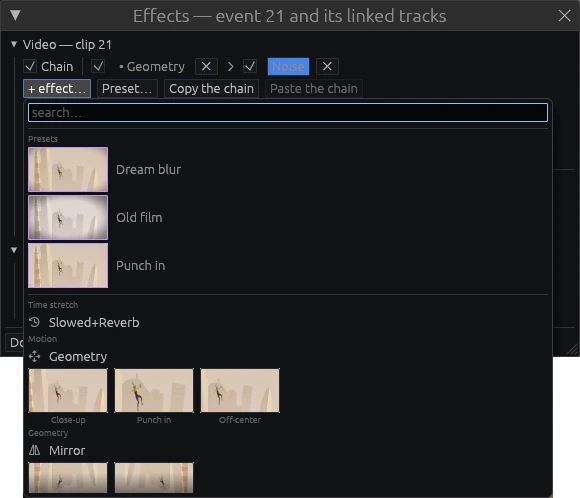
Effects are chained on an event or on a track. Slots can be reordered and switched off, the preview updates immediately, and export runs the same code. Any chain can be saved as a preset.
Geometry
Mirror
Corner Pin
Blur
Sharpen
Radial Blur
Greenscreen
Drop Shadow
Edges
Noise
VHS
Event Grid
Vignette
Pixelate
Halftone
Glow
Pan 3D
Cylinder 3D
Color Grade
Duotone
Posterize
Chromatic Aberration
Lens Distort
Twirl
Ripple
Kaleidoscope
26 video effects. The gallery previews each one on a frame of the selected event.
Audio
- 18 audio effectsGain, Slowed+Reverb, Pitch Shift, Filter, EQ, Distortion, Bitcrusher, Tremolo, AutoPan, Vibrato, Chorus, Flanger, Phaser, Delay, Compressor, Gate, Limiter, Stereo Width. A compressor on a music track can duck it under speech.
- Slowed+ReverbSlows the material down with the pitch falling and adds reverb with delay, decay, damping and wet level. On a video event it slows the picture too.
Every parameter of every effect, transition and title can be automated with curves. Automation keys are tied to the source material: trimming an event does not move them. The reverb tail continues past the end of the event.
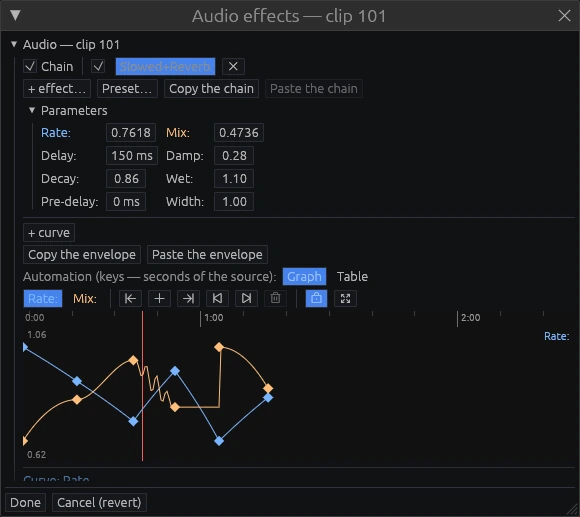
Rate and mix curves of Slowed+Reverb. Points can be dragged, and an envelope can be copied to another event.
Transitions, titles, generators
33 transitions
Wipes, iris, clock, push, slide, zoom, spin, whip pan, blinds, cube, page peel, glitch, film burn, light leaks and others. Their parameters can be automated like effect parameters.
Titles
Presets for lower thirds, headlines, typewriter, crawl and end credits. Font, alignment, fill, stroke, shadow and backing are set per title.
Generators
Solid colours, gradients, shapes, a countdown leader and test signals.
Morpher
A morpher sits on its own track and changes the events under it for as long as it lasts: it applies an effect batch, swaps the source, or both. It has fades, a strength control, and can be baked into the events.
- Source swapReplaces the source of the target events, for example rushes with the graded master, or shifts every in-point by the same amount. Cuts, durations and positions do not change.
- Effect batchThe batch is appended to the effect chain of every target event and applies live, without rendering.
- DeletingThe target events are not modified, so deleting the morpher returns the edit to its previous state.
- BakeBaking writes the morpher into the events and removes it; picture and sound stay identical. Baking can be undone.
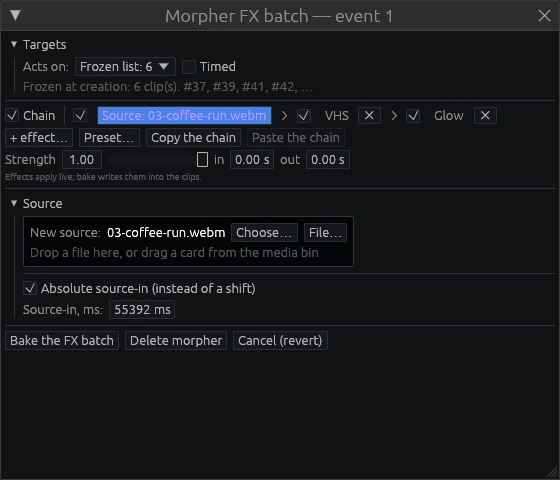
Six target events: a source swap, then VHS and Glow.
Media bin
Imported files appear in the bin as cards. Missing files open as placeholders and reconnect when the files are back.
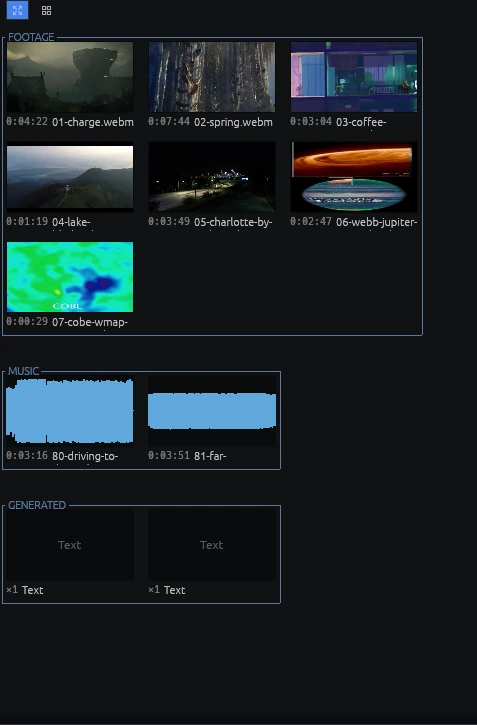
Groups are named in a break in their frame.
Cards show a poster frame, the duration or a waveform.
- ThumbnailsA video card shows a representative frame of the file instead of its first frame.
- ScrubbingMoving the mouse across a card plays through the file.
- WaveformsAudio cards show the waveform of the file.
- GroupsCards can be grouped, named and locked. A group moves as a whole.
- LayoutFree layout or grid. The arrangement is saved with the project.
- Dragging to the timelineWhile a card is dragged, the timeline shows the event outline, the target track and the snap line.
Export
MP4: H.264 video, AAC 48 kHz stereo, faststart. If a region is set, only the region is rendered.
- Encoder selectionIn automatic mode the hardware encoders are tried in turn, and each one is opened before it is used; one that fails to open is skipped. An encoder can also be chosen by hand.
- QualityCRF or a target bitrate, audio from 128 to 320 kbps, the project resolution or any size up to 4K.
- ProgressThe render window shows the phase, the remaining time and the speed relative to realtime. A render can be paused or cancelled.
- No intermediate filesEncoding and muxing run inside the editor process without writing temporary files.
- kt-cliThe command-line tool renders and exports a project file without a window.
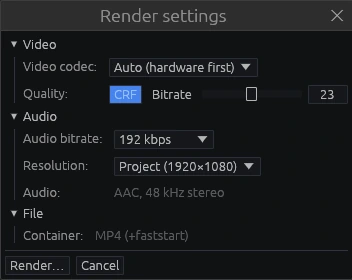
Render settings: codec, quality, audio and container.
Saving and recovery
Autosave
Every 30 seconds if the project changed, but not during a drag or playback. Files are written atomically, so a crash cannot leave a half-written project.
Project files
A project is a JSON file with relative paths to the media, so a copied or moved folder keeps working. The view, track names and bin layout are saved in it.
Cache
Waveforms and thumbnails are stored in a file next to the project. If it is deleted or a source file changes, only the affected data is rebuilt.
Diagnostics
The diagnostics window shows cache fill and shown versus dropped frames. When decoding cannot keep up with playback, a notification says so.
Keyboard
kinetren has no tooltips. The hint line at the bottom of the window describes the control under the cursor.
Transport
Editing
Region & markers
View
Roadmap
Planned
- Colour correction: curves, LUTs and scopes
- Audio noise reduction
- More export formats: ProRes, WebM, image sequences
- deb, rpm, AppImage and Flatpak packages
Versions
- 26:10:24v26.10.24
Windows build: a portable zip. FFmpeg 6, 7 or 8 is found on the system or downloaded on the first start.
- 26:10:22v26.10.22
The editor is renamed kinetren. Release builds in Docker, anonymous usage statistics that can be switched off, documentation in English.
- 26:10:03v26.10.03
Own project format
.kt. Projects from earlier versions open through import. - 26:09:26v26.09.26
Music ducking under speech works as a sidechain compressor. Still images on the timeline. Geometry handles in the preview.
- 26:09:22v26.09.22
Reels publish parameters, so each copy has its own values. Automation curves get segment shapes and formulas.
- 26:09:17v26.09.17
Effect gallery with previews on the event's own frame, effect presets, animated title presets.
- 26:09:16v26.09.16
33 transitions. Titles and generators.
- 26:09:15v26.09.15
Nested reels. Project lock and recovery after a crash.
- 26:09:14v26.09.14
14 new audio and 16 new video effects.
- 26:09:07v26.09.07
Slowed+Reverb slows the picture together with the sound.
- 26:09:06v26.09.06
Transitions between events, 16 kinds. One automation editor with a graph and a table.
- 26:09:04v26.09.04
GPU rendering. Keyframe automation for video effect parameters.
- 26:08:29v26.08.29
Interface in five languages: English, Spanish, Simplified Chinese, Arabic and Russian.
- 26:08:27v26.08.27
Media bin with free layout and grid. File, Edit and View menus. The hint line at the bottom of the window.
- 26:08:24v26.08.24
FFmpeg 6, 7 or 8 loaded at runtime. MP4 export inside the editor with automatic hardware encoder choice. The morpher.
- 26:08:22v26.08.22
Rewrite in Rust: audio engine, undo, project format, background decoding.
Download
Builds for Linux and Windows are on the releases page. On Linux, unpack the archive and run the installer: it installs into your home directory without root, adds kinetren to the applications menu and registers .kt project files.
# Linux: unpack and install
tar xf kinetren-*-linux-x86_64.tar.gz
cd kinetren-*-linux-x86_64
./install.sh

# or render from a terminal
kt-cli export project.kt out.mp4
- Linux
- x86_64, glibc 2.35 or newer — Ubuntu 22.04+, Debian 12+, Fedora 36+
- Windows
- Windows 10 or 11, x86_64. A portable zip, nothing is installed. On the first start kinetren finds a shared FFmpeg 6, 7 or 8 or offers to download one.
- Graphics
- Any driver with Vulkan or OpenGL. Without a GPU the CPU is used.
- Video
- FFmpeg 6, 7 or 8. On Linux the system one is used, with whatever hardware acceleration it was built with.
- Sound
- ALSA or PipeWire
- Installs to
~/.local— binaries, icons, desktop entry and the.ktproject type